

As the winter season draws in, everybody is thinking about the cost of their energy. Increasing fuel prices mean that every penny spent is under scrutiny, with more companies looking at where they can save money.
When you look at your electricity bill at home, you are billed on a per kWh basis. Depending on your tariff, this is a fixed cost per kWh, so no matter how much energy you are using, the price per unit stays the same.
With commercial premises, the billing system is different. You can incur penalties for peak demand and if you have key equipment starting up just after you move into a higher rate tariff, then you could be wasting large amounts of money. When you want to look at saving energy, the first place to start is your electricity bill. Look at where the most usage is and work out what equipment is running at the time to see if you can make some changes to save money without too much effort. Sometimes it may be a simple thing such as equipment being left on when not in use!
In addition to looking at your electricity bill, you can also carry out an energy survey. Use of energy analysers can help you to build a picture as to what is really going on. So, you can then compare the results of your survey to your electricity bill and make some real savings.
Introducing the Fluke 1730 Energy Analyser
So what can you use to carry out an energy survey? There are many units available on the market, however some models record too little or too much information, in addition they can be fairly complex to setup and download.

Simple Setup
One of the issues with some analysers on the market is the setup process. What do you want to measure, what sample interval do you want, how long should the survey run for? Along with this comes the worry that there may not be enough memory to store all the data and this has led to users connecting an analyser and returning in a week to find they only have two days of data and a full memory.
Another common issue is misconnection of the voltage leads or CTs. This can again lead to incorrect values being recorded, or in some cases where the CTs are the wrong way round, negative current readings. Finally, not starting the recording is a common mistake, with some analysers not making it obvious when recording has started, or users not realising buttons need to be held down for a set period of time before recording will start.
The Fluke 1730 takes the hassle out of connecting and configuring your survey. You simply enter the duration of the survey, from 10 minutes to 12 weeks, or no end if preferred, and the analyser will display the amount of memory or time period available. In addition it will give you the sample rate being used, which can be adjusted for longer surveys.
Another useful feature is an option to enter a survey description, ideal if you are carrying out multiple surveys at different sites, without downloading in between surveys.

Once the setup parameters are entered and connection made, you simply press the button to start logging, at this point the power button will flash to indicate the unit is recording and the display will show when measurements are captured in real time. This allows you to verify the analyser is definitely recording prior to leaving site.
What Does it Measure
As a basic load monitor, the Fluke 1730 won’t show you issues such as voltage disturbance, current inrush or harmonics, however it does log and report on the following parameters:
- Voltage
- Current
- Frequency
- THD of Voltage & Current
- AUX Voltage
- Active Power (W)
- Apparent Power (VA)
- Non-Active Power (var)
- Power Factor (PF)
- Energy (kWh)
- Fundamental Active Power (W)
- Fundamental Reactive Power (var)
- Fundamental Apparent Power (VA)
- Displacement Power Factor (DPF / cos Φ)
Intuitive Menus & Design
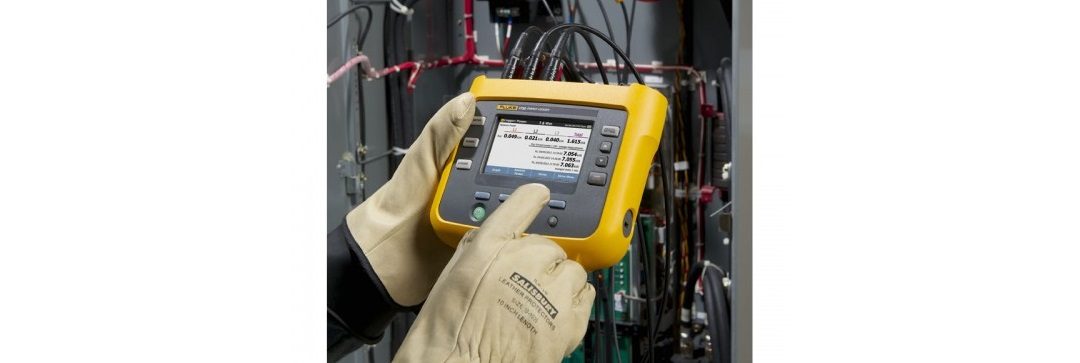
The Fluke 1730 has a series of menus, which can be accessed via the buttons on the front panel, or via the touch screen display. With safe working procedures in mind, the unit has been developed so that users can still easily access the menus, even if wearing safety gloves.
The colour LCD is very sharp, with readings displayed clearly and the option to dim the backlight to save battery life.


A standard USB port is available, this allows for transfer of data to a USB memory stick and also enables firmware updates to be done by the user.
Two auxiliary inputs have been included to allow for other accessories, such as temperature probes, to be connected and the data logged as part of the survey. An auxiliary input cable kit is available as an optional accessory.


Previous Fluke analysers had to be powered from a separate adaptor when logging, however this is not always easy as there may not be a socket outlet available at the source. With the new 1730, you can power the unit directly from the terminals at the incoming supply. In addition, the power module can be detached and connected to the unit with a lead to make it easier to use in confined spaces. All required leads are supplied as standard.
Energy Analyze Software
Performing an energy survey is no good unless the data can be easily read and analysed in the software. This is one area where the Fluke 1730 really comes into its own.
Previous software packages have often been difficult to navigate and sometimes problematic when trying to connect a unit and initiate the download. This doesn’t just apply to the Fluke models, similar issues are present throughout many of the analysers in the industry.
With the new Energy Analyze software, download is an incredibly simple process. We installed the software onto a Windows 7 PC, connected the 1730 and a simple click of a button presented all the data files available for download. Simply select the required information and the data will be presented in the software.
The layout is very user friendly and it only took a couple of minutes to work out what does what. Once you have analysed your data and made your diagnosis, you then need to create your report for the client. Energy Analyze features a nice drag-and-drop layout for fast and easy report creation, you select the elements you want to include and once complete, export the report to a PDF document to email to your client.
Final Summary
Overall the Fluke 1730 does exactly what you would expect and it makes it easy to perform load studies and energy surveys. Both the software and the analyser are easy-to-use and the accessories supplied are well thought out, with the user and applications in mind.
The price of £1,850.00 + VAT is a little on the high side, when compared to other alternatives available on the market, but you are getting value for money. If you are involved in performing regular energy surveys for your clients, or in-house, you will see a return on investment in no time at all.
The Fluke 1730 comes supplied with the following:
- Power Supply
- Voltage Test Lead
- Dolphin Clip, Black
- 3 x Thin Flexi Current Clamps (iFLEX1500), 1500A
- Colour Coded Wire Clips
- Mains Lead
- 10cm Test Lead with Stackable Plugs
- 2m Test Lead with Stackable Plugs
- DC Power Cable
- USB Download Lead
- Soft Carry Case
- 4GB USB Flash Drive, contains Software & User Manual
- Documentation Info Pack
If you are interested in learning more about this product, or if you would like to see a product demonstration, contact us on 01923 442244, or email us and we will be happy to discuss your requirements.


