


Fluke have upgraded their Ti100 series of thermal imaging cameras, offering wireless connectivity to their CNX branded test equipment. This new feature means that users can now transmit additional data, such as current readings, to their thermal camera, thus enhancing the reporting and diagnostic capabilities.
We got our hands on a new model and looked at how the system works, including the key benefits and how it compares to other similar products on the market.
How Effective is it?
The system works very well and does exactly what you would expect. The CNX module is easy to activate and connects to the camera effortlessly, with automatic assigning of an ID number. The only downside is that it can take around 5 – 10 seconds to locate the signal and connect, however it is stable and fast once paired with a device.
A key advantage of the CNX system is the ability to have up to 5 individual modules simultaneously transmitting data. This means that if you are capturing a thermal image of a 3 phase supply, you can take measurement readings for all 3 phases and transmit the data to the thermal camera in real time.
What Modules are Available?
At the moment there are 4 different modules available that will measure current, voltage or temperature. New modules can be added fairly easily, so you can be sure that Fluke will have more additions in the future. We would like to see a combined temperature & humidity meter as this would be useful for building applications.
What is the Point in Having this Extra Data?
A thermal camera on its own is extremely useful for detecting anomalies. You can quickly locate areas of concern, but sometimes the temperature reading alone may not be enough to diagnose a problem correctly. Consider an imbalanced load, the cable with greater load may only be a few degrees hotter than the others, however a check with a clamp meter will tell you just how much of a difference there is in the current flowing. As long as the flow is within the capacity of the cable, the imbalance will not be a hazard, but it may need looking at from a cost saving viewpoint. When you include this data in your report, it becomes more meaningful to the client, or to anyone who may be carrying out repair or maintenance work.
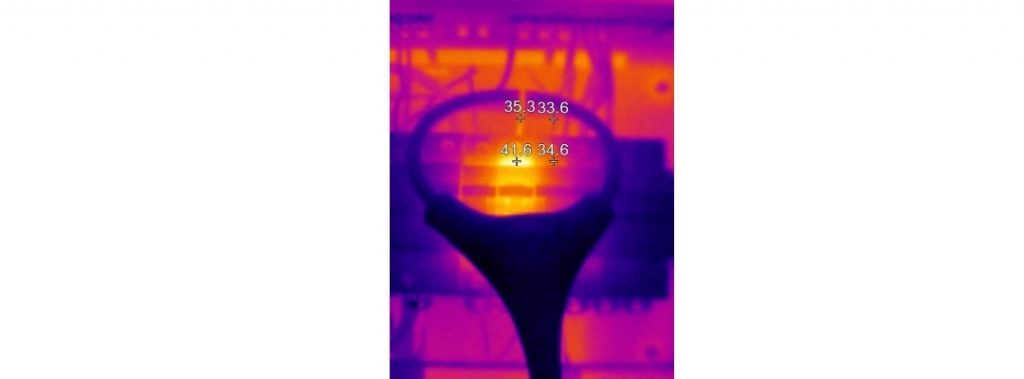
Using the Fluke Ti125 you can clearly see areas that may be a problem.


The wireless system is advertised by Fluke as having a propriety overlay to ensure it is not affected by other industrial equipment, such as radios or microwaves. We tested the signal quality and with direct line of sight, the signal was stable up to 20 metres away. This was reduced to around 15 metres with objects, such as racking, in the way.
With a thermography application, it’s unlikely you would be too far from the target, so we cannot see wireless connectivity ever being a problem.
How Does the Ti100 Series Compare to Other Products Available?
The Fluke cameras stack up well against competing products, such as the FLIR cameras. In general, at the 160 x 120 level, the cameras are fairly evenly matched, with both manufacturers offering good quality images, robust design, reliable battery life and good quality software.
The FLIR wireless offering gives you the choice of a clamp meter or an ambient temperature & humidity meter, with the camera only able to connect to one unit at a time. It is important to note though, that the FLIR system does allow you to transmit three separate current readings to a single thermal image.
The Fluke models allow for a maximum of 5 modules to be simultaneously connected, giving you more measurement capability, however the wireless option is currently only available on the 160 x 120 pixel range of cameras. If your application requires a higher resolution thermal image and you want the wireless capability, you’ll have to purchase a FLIR camera or wait until Fluke launch one.
Is the Upgrade Available for Existing Cameras?
The good news is yes, anyone who owns a current Ti100 series camera will be able to get the upgrade free of charge. All you need to do is connect the camera to your PC, open the SmartView software and run the update using the steps below:
- Enable the wireless feature with the free firmware upgrade
- Connect your Fluke thermal imager to your PC with the USB cable included with your purchase
- Update SmartView® software to latest version and open
- Pull down the menu under the thermal imager icon and select Enable CNX Wireless System and follow the instructions
- Connect the wireless modules to the equipment you want to test
- Activate CNX Wireless on your thermal imager and start capturing measurements
Upgrade your SmartView Software & Camera Firmware to enable CNX:


The free software has excellent reporting features and a simple “wizard” function that enables quick report generation in either Microsoft Word or as a PDF. The capabilities of the software are better than the free offerings from some other manufacturers, however it is not exactly intuitive, so a good read of the manual will be needed to fully grasp the functionality and to be able to use it properly.